AI Overviews and B2B Traffic: How Much You Are Losing and What Content Survives
October 22, 2026
G2, Reddit and Press: Where AI Vets You Before Recommending You in the US
November 5, 2026

How to Track ChatGPT and Perplexity Traffic in GA4, and Tie It to Demos
GA4 now reports some AI traffic on its own, but not all of it and not Perplexity. Google added an AI Assistant channel to the default channel group on May 13, 2026. A default setup still files part of your AI traffic under Referral, Unassigned or Direct. For a European SaaS entering the US there is a second blind spot: a cookie banner built for Europe can hide the visitors you are trying to measure.
This article shows how to see what GA4 can see, add what it misses, and connect AI visits to demos. Counting visits is only half the job. The other half is knowing which of them became pipeline, and our guide to demand generation KPIs covers how to report that.
Why GA4 Hides Your AI Traffic
AI referral traffic is hard to see because GA4 sorts visits by two labels, source and medium, and AI assistants do not always send either one. A visit with a clear referrer is classified. A visit without one is not.
Referral, Direct and Unassigned: where each visit lands
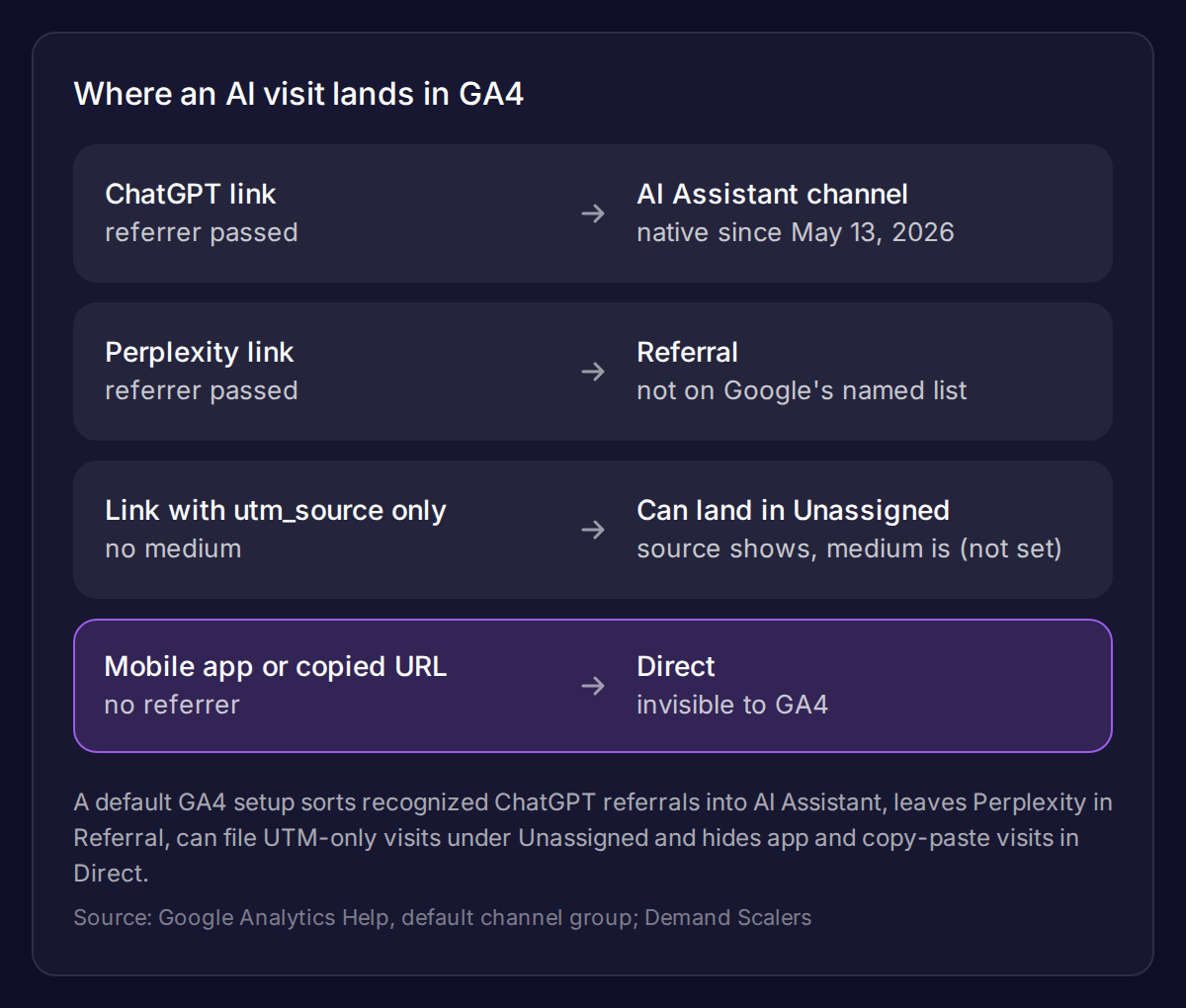
Where an AI visit lands depends on what the click carries:
- A recognized assistant with a referrer. Google’s default channel group documentation describes an AI Assistant channel for visits from sources like ChatGPT, Gemini, Deepseek, Copilot and Grok. It excludes Google’s AI Overviews and AI Mode, which stay in Organic Search.
- Perplexity. It is not on Google’s named list. Practitioners report it arrives as perplexity.ai / referral and sits in Referral unless you add a rule.
- A link tagged with
utm_sourceonly. Analysts report that ChatGPT has addedutm_source=chatgpt.comto many citation links since mid-2025, without a medium. Those visits can show as chatgpt.com / (not set) and land in Unassigned. I found this in practitioner write-ups, not in OpenAI documentation.
What you will never see: mobile apps and copied URLs
Visits with no referrer fall into Direct, whatever the assistant is. That includes links opened from a mobile app and URLs a buyer copies and pastes into a new tab. GA4 cannot tell them from someone typing your address.
Treat every AI number in GA4 as a floor, not a total.
Set Up an “AI Search” Channel in GA4, Step by Step
Start with the native channel, then add a custom one for what it misses. In Reports, open Acquisition, then Traffic acquisition. Set the primary dimension to Session default channel group and look for the AI Assistant row. Google’s default channel group cannot be edited. Analysts also report that the native channel is not applied retroactively and that Google has not published its list of recognized assistants.
That is why a custom channel group is still worth building. It covers Perplexity, works on historical data and uses your own list of assistants.
A custom channel group and the regex that works
In Admin, go to Data display, then Channel groups, then Create new channel group. Name the group “AI Search” and add a channel with the same name. Set two conditions joined by OR:
- Source matches regex:
^(.*\.)?(chatgpt\.com|chat\.openai\.com|perplexity\.ai|claude\.ai|gemini\.google\.com|copilot\.microsoft\.com|grok\.com|deepseek\.com)$ - Medium exactly matches:
ai-assistant
GA4 regex must match the whole value, which is why the pattern is anchored. I have not run this on your property, so test it before you trust it. Open a live ChatGPT or Perplexity answer, click a link to your site and check Realtime for the expected source.
Place the channel above Referral
GA4 assigns each session to the first channel whose rules it matches. If AI Search sits below Referral, Perplexity visits are claimed by Referral first and never reach it. Drag AI Search above Referral. Then switch the Traffic acquisition report to your custom channel group.
utm_source=chatgpt.com and (not set) traffic
Do not restrict the rule to medium = referral. Visits that arrive as chatgpt.com / (not set) have no medium at all and would be missed. Matching on source catches them.
Keep your own paid tagging separate from this. If you run ChatGPT Ads, use the tagging in our guide to ChatGPT Ads for SaaS so paid visits never mix with organic AI referrals.
The Cookie Banner That Blinds You in the US
A consent banner decides how many of your visitors GA4 can see at all. A European company often reuses its home-market banner for every visitor. If that banner blocks analytics until someone clicks Accept, every US visitor who ignores it is invisible to GA4.
A European banner applied to every visitor
Whether US visitors need an opt-in banner is a legal question, so ask counsel. The measurement effect is separate and easy to check. Compare your US sessions with your US form submissions or your CRM’s US leads. If the sessions are far lower than the leads imply, consent is a likely cause. Many consent platforms can show different banners by region.
Consent Mode and modeled data (validate with legal counsel)
Consent Mode in its advanced setup lets Google estimate the behavior of visitors who decline. Google’s documentation sets eligibility rules. The property needs at least 1,000 events a day with analytics storage denied for at least 7 days. It also needs at least 1,000 daily users with storage granted on at least 7 of the previous 28 days.
A European SaaS that has just entered the US will often sit below those thresholds on US traffic. Then no modeling applies and the gap is permanent. Confirm your implementation and the legal basis with counsel before you change anything.
From Traffic to Demo: Connect AI to Pipeline
Counting AI visits is only half the job. A visit that never becomes a demo request does not change your pipeline. Connect the two with a key event and one question on your form.
Key events by cited landing page
Mark your demo request as a key event. Then, in Explore, build a table with Landing page as the rows and your AI Search channel as a filter. Add the key event as a metric. You now see which cited pages bring visitors who convert, not just visitors.
Compare that against the pages you want cited. Our work on attribution for AI-driven SaaS campaigns goes deeper on reading this data when the path is not linear.
The “How did you hear about us?” field on the demo form
Add an open text field to the demo form, and add a short list of options that includes “ChatGPT, Perplexity or another AI assistant.” Send the answer to your CRM next to the GA4 source.
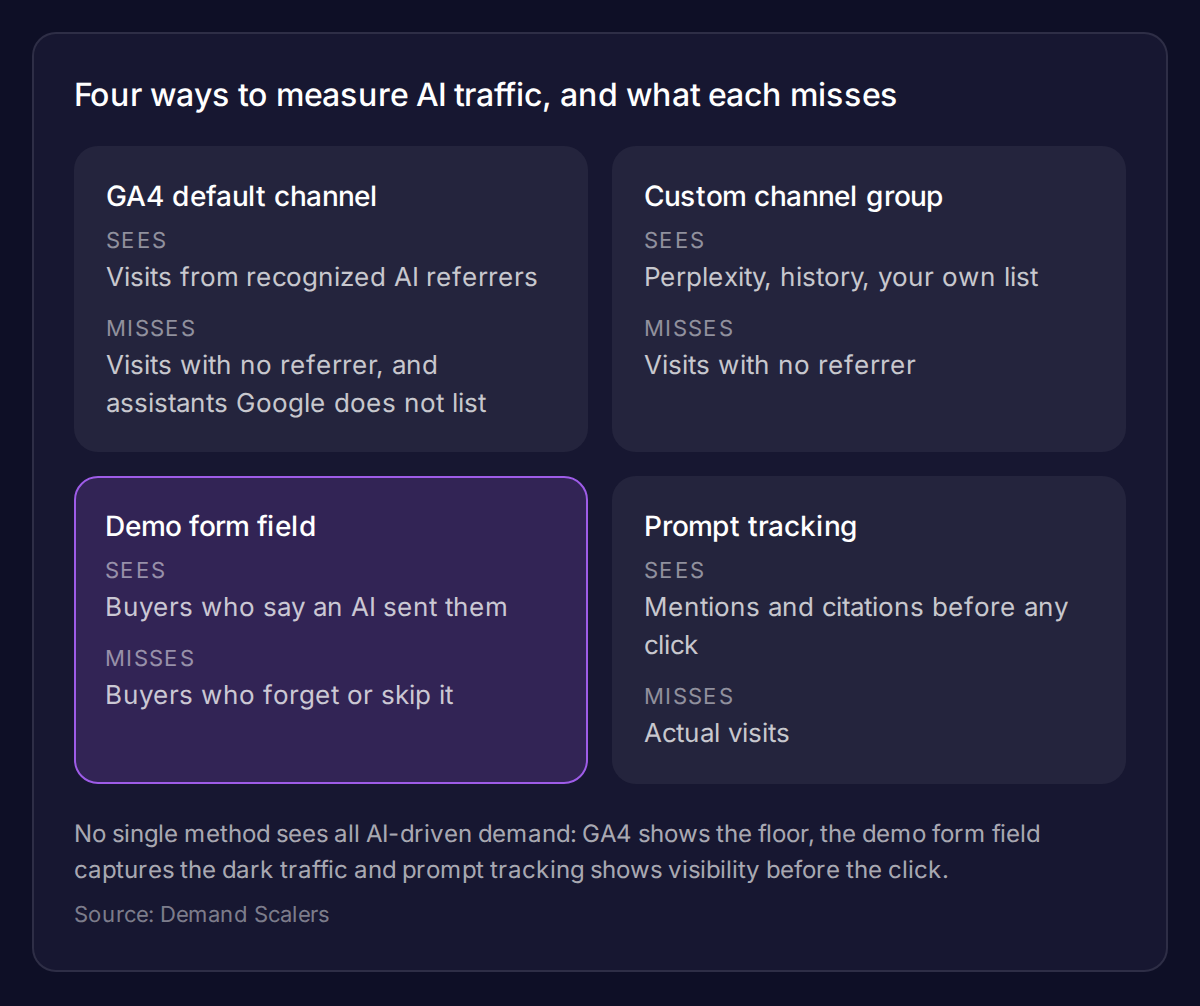
This field is the only measurement that catches dark AI traffic. A buyer who copies a link from ChatGPT arrives as Direct but can still tell you where they came from. Compare the count of AI answers with the count GA4 reports, and you get a rough estimate of the visits GA4 hides.
Measure What GA4 Cannot See
GA4 shows the floor, so add two measures that cover what it cannot. Dark AI traffic is real demand that arrives without a label. Your form field estimates it, and prompt tracking shows whether you were visible before anyone clicked.
Weekly manual prompt tracking
Keep a spreadsheet with 20 prompts your US buyer would type. Once a week, run each in ChatGPT and Perplexity. Log whether you are mentioned, whether your pages are cited and which competitors appear. Answers vary between runs, so note the date and the engine, and look at the trend over several weeks, not a single result.
When an AI visibility tool is worth paying for
Stay with the spreadsheet until it becomes the bottleneck. A paid tool earns its cost when you track well over 100 prompts, need share of voice across several engines, or must report to a team every month. Before that, the spreadsheet and the form field give you the signal at no cost.
If you want a team to set this up and tie it to your pipeline, see our SEO and GEO service.